


Razor Syntax Basics — A Super Easy & Fun Starter Guide!
👋 Introduction to Razor Syntax Basics
If you are building ASP.NET Core MVC applications, you must understand Razor Syntax — the powerful and super-friendly engine behind your .cshtml views.
This guide will help you Learn Razor in the simplest possible way.
Think of this page as your quick overview!
To learn complete Razor Syntax in detail, visit:
🔗 https://www.completecsharptutorial.com/legacy/razor-tutorial/
This guide explains Razor fully, with deep examples.
Let’s quickly understand the essentials! 🚀
📚 What you are going to learn in this lesson
✔️ What Razor Syntax means
✔️ How Razor mixes HTML + C#
✔️ How to write variables in Razor
✔️ How to write loops & conditions
✔️ How Razor automatically detects C# code
✔️ Small examples with output
✔️ A real-life scenario where Razor helps
🧠 What Is Razor Syntax?
Razor Syntax is a lightweight markup syntax used in ASP.NET Core.
It lets you write HTML + C# together in the same file.
Why is this cool?
Because you can generate dynamic pages easily — without messy code.
Razor Syntax always starts with @ symbol.
Examples:
@DateTime.Now@Model.Name@foreach(...)
This is why developers love to Learn Razor — it is simple, elegant, and fast.
🔧 Razor Syntax Basics (Quick Overview)
✔️ 1. Razor Variables
					@{
    var message = "Hello Razor!";
}
<p>@message</p>
Output:
Hello Razor!
✔️ 2. Razor Condition (if/else)
					@{
    int age = 20;
}

@if(age >= 18)
{
    <p>You are adult.</p>
}
else
{
    <p>You are minor.</p>
}
Output:
You are adult.
✔️ 3. Razor Loop Example
					@foreach(var item in new[] { "Red", "Green", "Blue" })
{
    <li>@item</li>
}
Output:
					• Red
• Green
• Blue
✔️ 4. Inline Razor Expression
<p>Today is @DateTime.Now.DayOfWeek</p>
Output:
Today is Wednesday
🧪 Simple Program Demonstrating Razor Syntax
Here is a clean example showing several features together:
Controller
					public IActionResult Demo()
{
    ViewBag.User = "Prashant";
    ViewBag.Numbers = new int[] { 10, 20, 30 };
    return View();
}
View (Demo.cshtml)
					<h2>Hello, @ViewBag.User 👋</h2>

@foreach(var n in ViewBag.Numbers)
{
    <p>Number: @n</p>
}

<p>Total items: @ViewBag.Numbers.Length</p>
Expected Output:
					Hello, Prashant 👋
Number: 10
Number: 20
Number: 30
Total items: 3
This is how quickly you can Learn Razor and build dynamic UI.
📘 Flow Chart — How Razor Works
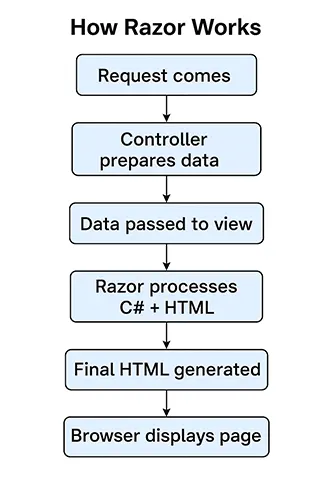
- Request comes → Controller
- Controller prepares data (Model, ViewBag, ViewData)
- Data is passed to View
- Razor Syntax processes C# + HTML
- Final HTML is generated
- Browser displays the page
Simple, right? 😊
🧑💻 Real-Life Scenario — Fixing Display Issues
Imagine a product page suddenly showing blank pricing.
You check the View and find:
❌ A missing @Model.Price
❌ A typo inside Razor @foreach
❌ Wrong variable name
Because you understand Razor Syntax, you quickly solve the issue.
This saves:
✔️ Time
✔️ Customer frustration
✔️ Your weekend 😄
That’s why every MVC developer MUST Learn Razor.
👉 Next what?
In the next chapter you will learn Create Master Page Layouts — the heart of building professional websites in ASP.NET Core.
Ready for the next adventure? ✨🚀
