


Views in .NET Core Explained Simply — A Fun Beginner Guide!
Introduction to Views in .Net Core C#
If you want to build beautiful web pages in ASP.NET Core MVC, then Views in .Net Core is the place to start. In this .Net Core Views Tutorial, you will Learn Views in .Net Core step by step in a simple and friendly way.
Views allow your app to show data, display UI, and create a great experience for your users. Let’s learn this together! 🚀
📚 What You Are Going to Learn in This Lesson
✔️ What Views are in MVC
✔️ Why we need Views in .Net Core
✔️ How Views display data
✔️ How to create a View file
✔️ How Controllers send data to Views
✔️ Simple examples with output
✔️ A real-life scenario where Views help
⭐ What Are Views in .Net Core?
Views in .Net Core are simply HTML pages mixed with Razor syntax.
They display data sent from the controller.
In MVC, the Controller handles logic, and Views handle UI.
So in short:
- Controller = Thinker
- View = Presenter
- Model = Data
Because of this clean separation, your code stays organized and easy to maintain.
🧱 Folder Structure of Views in .Net Core
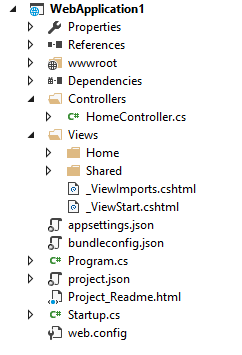
When you create an MVC project, you get a folder called Views.
Inside Views:
Each Controller gets its own folder
Each screen/page is a
.cshtmlfileShared Views go inside Views/Shared
Example:
					Views
 ├── Home
 │    ├── Index.cshtml
 │    └── About.cshtml
 ├── Product
 │    ├── List.cshtml
 │    └── Detail.cshtml
 └── Shared
      └── _Layout.cshtml
🧪 Simple Coding Example — Creating a View
Controller:
					public class HomeController : Controller
{
    public IActionResult Index()
    {
        ViewBag.Message = "Welcome to Views in .Net Core!";
        return View();
    }
}
View (Index.cshtml):
					<h1>@ViewBag.Message</h1>
<p>This page is created using .Net Core Views Tutorial content.</p>
✅ Expected Output:
					Welcome to Views in .Net Core!
This page is created using .Net Core Views Tutorial content.
💡 Example 2 — Passing a Model to View
Controller:
					public IActionResult ShowStudent()
{
    var student = new Student() { Name = "Ravi", Age = 18 };
    return View(student);
}
View:
					<h2>Student Details</h2>
<p>Name: @Model.Name</p>
<p>Age: @Model.Age</p>
Output:
					Student Details
Name: Ravi
Age: 18
✔️ This helps beginners Learn Views in .Net Core more clearly.
💡 Example 3 — Displaying List Data
Controller:
					public IActionResult Products()
{
    var items = new List<string>() { "Laptop", "Mouse", "Keyboard" };
    return View(items);
}
View:
					<h2>Available Products</h2>
<ul>
@foreach(var item in Model)
{
    <li>@item</li>
}
</ul>
Output:
					Available Products
• Laptop
• Mouse
• Keyboard
This is where the .Net Core Views Tutorial becomes fun! 🎉
🧑💻 Real-Life Scenario — Fixing an App Crash
Imagine you run an online shop. One day, a page shows a blank screen.
Customers complain. You panic a little 😅 but then you check the View.
You discover:
❌ A missing variable
❌ A wrong model
❌ A broken Razor tag
Because you understand Views in .Net Core, you quickly fix it and your page is back online. Users are happy, and your boss praises you.
This is why it’s so important to Learn Views in .Net Core.
👉 Next what?
In the next chapter you will learn Razor Syntax Basics — the magic language behind all Views in .Net Core.
Get ready! ✨
